Product
Adding Vision to a Franka Panda Robot in MuJoCo
A robot arm moves with precision but sees nothing. See how Drift adds a wrist camera to a Franka Panda in MuJoCo and streams its live view, all from one prompt.
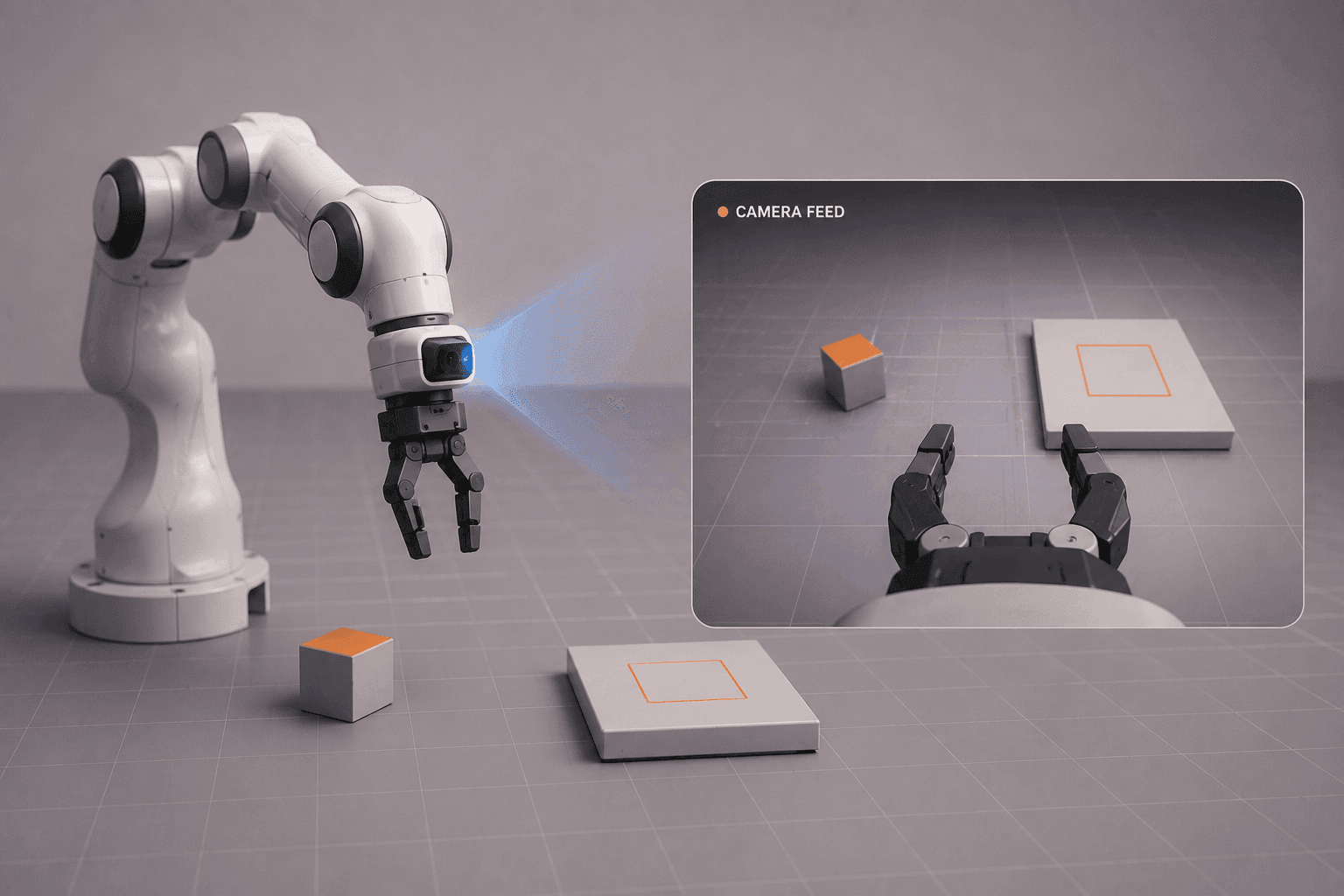
A robot arm can move with incredible precision. Without a camera, though, it has no idea what's actually in front of it.
This walkthrough adds a camera to a Franka Panda in MuJoCo, giving the arm the ability to see, and rather than editing the model by hand, we let Drift attach the camera and wire up the live feed from a single prompt.
Why a robot arm needs a camera?
A Franka Panda knows its own joint positions with high accuracy, so it can repeat a memorised motion perfectly. What it can't do without vision is react to anything it wasn't told about in advance.
Add a camera and that changes. The arm can locate an object that isn't in a fixed position, tell one item from another, and adjust to a scene that looks different from last time. For any task outside a rigidly structured setup, vision is what turns a precise-but-blind arm into one that can respond to the world in front of it. It's the same shift we saw when adding a LiDAR to a mobile robot, just aimed at manipulation instead of navigation.
Adding a wrist camera with a single Drift prompt
Starting from the existing scene, we give Drift a simple instruction: add a camera to the Franka Panda arm in MuJoCo and display its camera feed.
Mounting the camera on the gripper, a wrist camera, is a common choice for manipulation, because the camera looks out from roughly where the hand acts. That gives the arm a close, first-person view of whatever it's reaching for.
How Drift attaches the camera and configures the feed?
From that prompt, Drift updates the simulation, attaches a camera to the robot, and configures the live camera stream. The sensor is added to the robot description and wired so its output can be displayed as the simulation runs.
What would normally mean editing the model, placing the camera frame, and setting up the rendering by hand is handled in one step. If you're starting earlier, here's how to build the pick-and-place scene with this arm first.
Launching the live camera feed in MuJoCo
Time to launch. With the camera attached, we run the simulation and bring up the feed.
Now we can see exactly what the robot sees as it moves through the scene. The view shifts with the arm, tracking whatever the gripper is pointed at. That first-person perspective is the raw input every vision-based behavior builds on, and watching it move with the arm makes it clear what the robot has to work with.
What vision unlocks for a robot arm?
Giving a robot vision is a small addition with a large payoff. It's the first step toward tasks like object detection, visual servoing, where the arm uses the camera feed to guide its motion in real time, and autonomous manipulation.
It's a simple change that opens up a whole new way for the robot to understand its environment. With vision in place, the next challenge shifts from moving accurately to deciding what to do with what it sees. That's where manipulation gets genuinely interesting. Add a camera, launch the feed, and start exploring what the arm can do once it can see. The full walkthrough is in the video above.
FAQ
- How do you add a camera to a robot in MuJoCo? You add a camera to the robot's description, position it, for example on the gripper, and configure the simulation to render its view. In this walkthrough, Drift attaches the camera to a Franka Panda arm and sets up the live feed from a single prompt.
- Why mount the camera on the gripper? A gripper-mounted, or wrist, camera looks out from near where the hand acts, giving the arm a close first-person view of whatever it's manipulating. This is a common setup for manipulation because it keeps the target in view as the arm approaches it. The Franka Panda model used here comes from the MuJoCo Menagerie collection.
- What can a robot arm do once it has a camera? Vision enables tasks like object detection, visual servoing (using the camera feed to guide motion in real time), and autonomous manipulation. It lets the arm find and react to objects instead of only repeating pre-programmed motions.
- What is visual servoing? Visual servoing is a technique where a robot uses live camera data to control its motion, continuously adjusting toward a visual target. It lets an arm home in on an object even if that object moves or wasn't in a fixed position.
- What does Drift do when adding a camera? Drift updates the simulation, attaches the camera to the robot, and configures the live camera stream, all from a natural-language prompt, so you can see what the robot sees without manually editing the model or rendering setup.